

Kev Lag Luam Kev Tsim Kho Kev Lag Luam

Txoj kev txhim kho yav tom ntej ntawm pej xeem kev thauj mus los: microcirculation tsis pub dhau cheeb tsam + hla - Cheeb Tsam hom.
Tsis pub dhau thaj av: me me - Peev xwm micro - Lub tsheb npav thauj mus los ntawm cov neeg caij tsheb ciav hlau ntawm cheeb tsam hauv cheeb tsam, thaum tseem muaj kev sib ntsib hauv cov chaw hauv cheeb tsam hauv cheeb tsam.
Nruab nrab ntawm thaj chaw: siab - Muaj peev xwm sib tw ntev - thiab lwm yam, yuav txuas ntau lub chaw tos npav ntau hauv cheeb tsam chaw nyob kom nyob deb - Cov tsheb thauj mus los hauv cheeb tsam hauv cheeb tsam.
Qhov ntawm cov tsheb npav - Thov kom cov hauv kev zoo tshaj los txhim kho kev ua haujlwm ntawm microcirculation ntawm ib cheeb tsam thiab ntsib kev xav tau tus kheej.
Cov neeg caij tsheb: kev thov sib tham, txoj kev taug kev ncig
Cov neeg caij npav: Txo cov nqi, ua tau zoo, ua tau zoo, thiab txhim kho kom zoo
Tsoomfwv: Txhawb nqa los ntawm Digital txawj ntse, tau txiaj ntsig pej xeem
Kev Pabcuam Ncig Tebchaws
Raws li cov kev xav tau ntawm cov neeg muaj kev sib tw mus, nws tuaj yeem muab cov tsheb npav uas muaj kev tshwj xeeb, thaum tseem muaj nqi thauj khoom thiab txhim kho kev ua haujlwm rau cov tuam txhab npav.
Pej Xeem Tsheb Pej Xeem
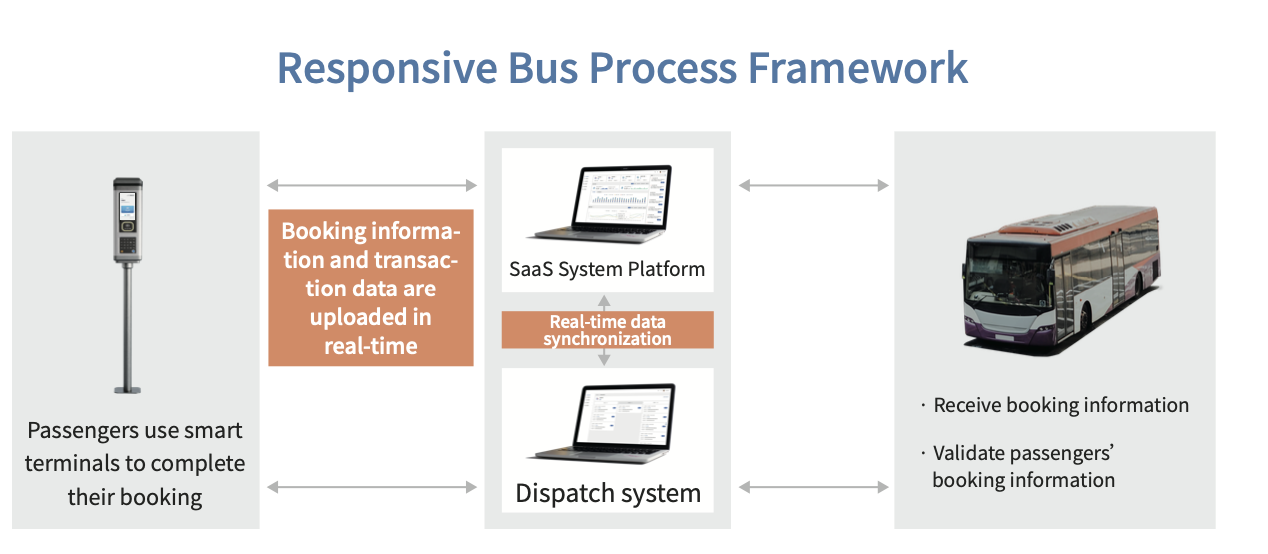
Lub platform sib xyaw ua ntau yam loj - Qauv Qauv Tshawb Fawb Algorithms. Los ntawm kev txheeb xyuas cov ntaub ntawv tseem ceeb, nws tuaj yeem muab cov tsheb thauj khoom, cov tsheb xa tawm, thiab ua kom cov kev ua kom zoo.
Cov ntaub ntawv paub
Ntau lub npe POS, cov neeg caij tsheb thauj cov khoom lag luam uas cov neeg caij tsheb, cov chaw tshwj tseg, thiab mini - Cov kev pab sau cov ntaub ntawv tseem ceeb.
Txheej Txheem Workflow - Offline tshwj tseg
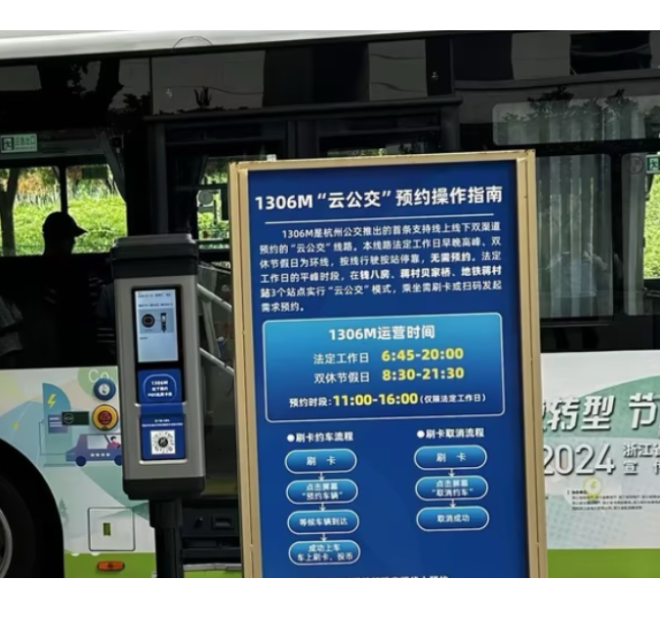
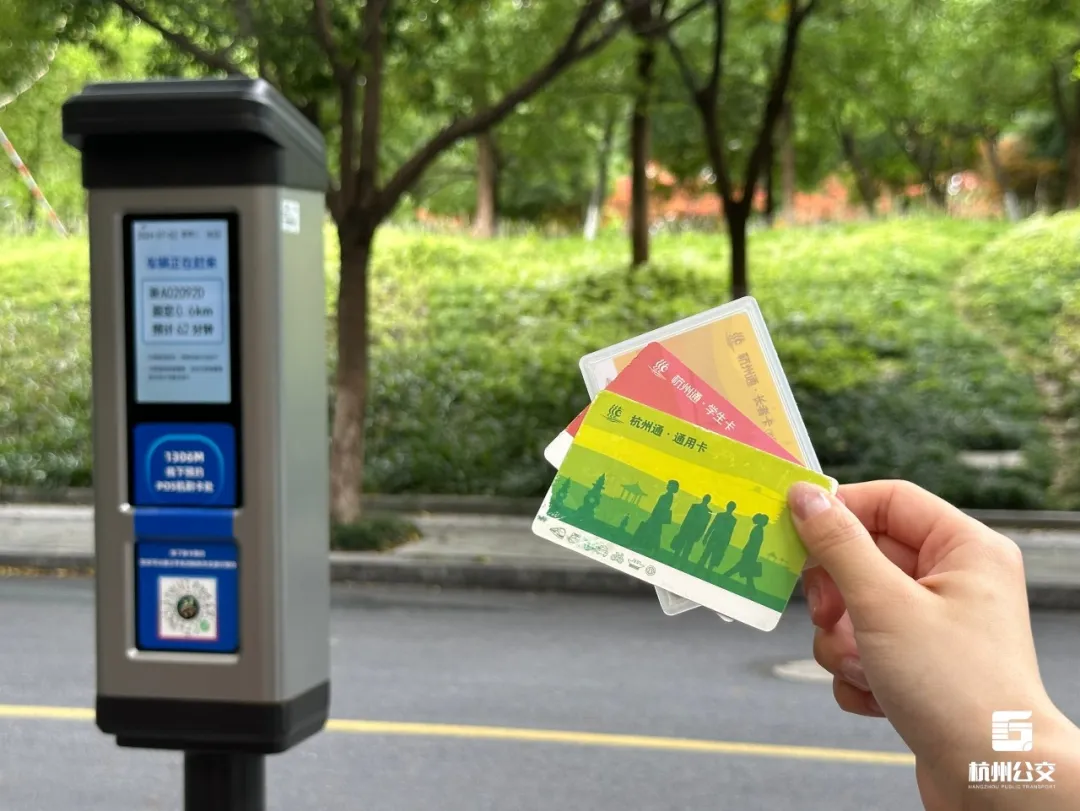
Cov neeg caij tsheb tuaj yeem siv lub chaw tshwj tseg ntawm chaw tos tsheb npav kom coj mus rhaub lawv daim npav SORN, lossis lwm yam phaib. Lawv tuaj yeem ua raws li ntawm - Screen hais kom ua tiav qhov chaw tos tsheb npav uas tsis tas yuav muaj tsheb npav chaw tos tsheb npav uas tsis tas yuav muaj lub xov tooj smartphone.
Ntse Dispatch
Lub tsheb npav golong loj cov ntaub ntawv kev tshuaj xyuas platform yuav muab cov tsheb thauj khoom thiab xa cov npav thauj los ntawm cov ntaub ntawv tsom kwm loj. Cov ntaub ntawv xws li lub tsheb daim ntawv tso cai, qhov chaw, thiab lub sijhawm tuaj txog yuav tshwm sim rau lub davhlau ya nyob twg kom nco ntsoov cov neeg caij tsheb.
POS them nyiaj
Cov neeg caij tsheb tuaj yeem coj mus rhaub lawv daim npav lossis scan ib tus qr code rau kev them nyiaj tom qab boarding. Tom qab lub POS tshuab ua txoj kev them nyiaj, qhov kev txiav txim yog sau cia.
Tiag tiag - sijhawm kuaj xyuas
Cov neeg caij tsheb tuaj yeem taug qab lub npav lub npav tiag tiag - Qhov chaw nyob thiab saib lawv txoj kev taug kev los ntawm Mini - Cov Kev Kawm.
POS them nyiaj
Cov neeg caij npav them nyiaj los ntawm daim npav lossis QR code. Thaum lub nroog Terminal txheej txheem them nyiaj, kev txiav txim tshwj tseg yog cia li tshem tawm.
Tus neeg caij - Sab mini program
Kev Xaiv Txoj Kev Xaiv:Cov neeg caij tsheb tuaj yeem xaiv los ntawm ntau cov kev xaiv taug kev ncig xws li cov tsheb npav customized, tshwj xeeb cov tsheb npav, thiab cov chaw tsheb thauj mus los, cov chaw tsim khoom lag luam raws li lawv cov kev xav tau.
De - Up thiab poob - Tawm thaj chaw:Cov neeg caij tsheb tuaj yeem xaiv cov boarding thiab poob - tawm chaw nres tsheb raws li lawv cov kev xav tau kev mus ncig ua si.
Hnub Xaiv Ua Si:Cov neeg caij tsheb tuaj yeem xaiv cov hnub taug kev taug kev raws li lawv cov kev xav tau.
Kev them nyiaj them:Cov neeg caij tsheb tuaj yeem ua tiav cov nyiaj them rau lawv cov kev txiav txim mus ncig ntawm mini program.
Cov Khoom Siv Ntawm Txoj Kev:Lub kaw lus tuaj yeem cia li khaws cov ntaub ntawv GPS thiab muab cov neeg caij tsheb nrog cov tswv yim tiag tiag - cov lus teb rov qab.
Kev Tswj Xyuas:Cov neeg caij tsheb tuaj yeem nug thiab tswj ob qho tib si ua tiav thiab tseem tab tom xaj dhau los.
AI Intisticisting Displatch:Ai Qauv Txheej Txheem Qhia Txog Cov Ntaub Ntawv Sib Koom xws li Chaw Nres Tsheb, Chaw Ua Haujlwm, thiab lub tsheb sib txuas ua ke kom muab faib xaj.
Lub Golong BI Tool:Ib qho teeb meem tshwm sim ntawm cov nyiaj tau los, tsheb, cov neeg caij tsheb khiav, thiab cov ntaub ntawv xa tawm yog muab, sib sau cov ntaub ntawv pom kev dashboard.
Kev Txiav Txim Siab rau Kev Ua Haujlwm Zoo:Muab kev soj ntsuam kev sib txawv ntawm cov ntaub ntawv xws li chaw nres tsheb cov neeg caij tsheb khiav thiab hloov chaw nres tsheb, txhawb nqa cov chaw nres tsheb, thiab kev txiav txim siab - ua.
Tsav - Sab Nta:Txoj Haujlwm Kev Taw Qhia
Lub platform yuav tsim cov kev tsav tsheb raws li nqa tau ntev ntev - Up qhov chaw thiab deb thiab xa nws, nrog rau cov neeg caij tsheb, mus rau tus neeg tsav tsheb. Tus neeg tsav tsheb ua raws cov lus qhia kom tuaj tos thiab tso tawm cov neeg siv khoom.
Kev tso chaw rau cov neeg caij npav:Txhawm rau pab cov neeg caij tsheb tsis muaj smartphones lossis menyuam yaus, tus neeg tsav tsheb tuaj yeem xa lawv cov-

Kev cai tshwj tseg lub davhlau ya nyob
- Daim npav - kev cai tshwj tseg
- Lub davhlau ya nyob twg txhawb kev muab kev pabcuam ntawm cov npav laus, cov npav me nyuam, lossis lwm hom kev thauj khoom.
- Xa / Ncua tseg xaj
- Cov neeg caij tsheb tuaj yeem xa lossis tshem tawm cov ntawv xaj kev cai tshwj tseg raws li xav tau los ntawm lub davhlau ya nyob twg.
- Dispatch zaub
- Tom qab ib qho kev txiav txim tau ua tiav lawm, lub davhlau ya nyob twg qhia txog lub tsheb daim ntawv tso cai ntawm lub tsheb npav, deb mus rau lub chaw nres tsheb, thiab kwv yees lub sijhawm tuaj txog.

Cov Ntsej Muag Wortive SEARTIC TSHUAB Nta: Tus Kheej Tus Kheej thiab Cov Lus Qhia Tshiab
Qhov tshob ntawm lub tshuab ntse kev lag luam uas:
- Lub tshuab ua tau zoo thiab yog tsim tshwj xeeb rau cov chaw sab nraud. Nws yog kev txhim kho customized raws li kev cai ua lag luam kev lag luam, kev ua haujlwm txawb kev them nyiaj rau hauv cov cuab yeej hauv kev txawj ntse.
- Qhov system no, cia siab rau mobile internet thiab wireless kev sib txuas lus thev naus laus zis, muab kev pab lub chaw tos npav. Nws ua tau zoo txo cov neeg caij npav tos sijhawm thiab txhim kho kev ua haujlwm hauv tsheb loj. Nws yog tsim los txhim kho kev siv nyiaj ntau thiab txo cov khoob hauv cov tub ntxhais kawm ib hnub twg, kev sib sau ua ke, thiab cov nyiaj so koobtsheej rau cov txheeb ze thiab phooj ywg. Lwm lub hom phiaj ntawm GOLong lub tshuab tuav kev lag luam uas yog txhawm rau nce cov nqi siv nyiaj ntau thiab txo qis khiav.
Lwm Qhov Zoo:
Kev ua kom tau yooj yim muab faib:Cov khoom txhawb lub nroog fais fab kev nkag tau kom ntseeg tau tias qhov ruaj khov siv hluav taws xob hom kom ntseeg tau kev ua haujlwm tsis tu ncua thaum tsis muaj lub nroog tsis muaj lub zog. Nws zoo ua tiav qhov tseeb - sij hawm sib faib thiab meej phim ntawm kev xav tau tsheb thiab cov ntaub ntawv muaj peev xwm. Nws kuj kho chaw tos tsheb npav los ntawm cov ntaub ntawv tiag tiag - Cov ntaub ntawv kev tshawb xyuas kom tsis txhob nres ua haujlwm tsis muaj txiaj ntsig thiab txhim kho kev caij tsheb ua haujlwm.
Txhim kho cov neeg caij npav zoo siab: tNws muaj kev daws teeb meem yuav muab kho tau raws li cov neeg caij tsheb ntev dua.
Kev txuag hluav taws xob thiab emission txo:Nws txo qis kev taug kev mus ncig ua si, txo qis zog siv hluav taws xob, thiab pab txo cov pa roj carbon emissions, txhawb kev txuag ib puag ncig.
Txo cov nqi ua haujlwm:Los ntawm kev txo kev mus ncig ua si thiab kev txhim kho txoj kev npaj ua kom zoo, nws txo qis cov nqi.
Cov kev xav tau:Rau cov chaw nyob deb nroog uas muaj cov kev xav tau me me thiab dispersive tsheb npav ua tau raws li cov pab pawg npav nyob deb nroog thiab ua tiav tau tseeb ntawm kev xav tau kev xav tau ntawm kev xav tau tsheb thiab khoom muaj peev xwm.
Txo cov nqi kev khiav haujlwm, thiab muab cov neeg caij tsheb nrog kev hloov tau sai dua, thiab yoog raws kev mus ncig ua si, thiab kev taug kev mus ncig ua si. Hauv cov qauv no, cov tsheb thauj mus los kho lawv lub tswv yim nres hauv tsheb thiab ntawm lub sijhawm tsis tsim nyog thiab lub sijhawm mus ncig ua si kom muaj kev nyab xeeb, kev pab tu, thiab kev pab cuam sai, thiab xis pab.

Kev ua kom tau yooj yim muab faib:Tiag tiag cov ntaub ntawv lub sijhawm tsom xam txhua qhov chaw tos npav raws li cov neeg caij tsheb thov thiab txhim kho kev ua haujlwm tsis muaj txiaj ntsig.
Ntxiv cov neeg caij npav zoo siab:Cov kev daws teeb meem ntawm lub sijhawm tiag tiag - sijhawm kom tau ntsib cov neeg caij tsheb, ua rau muaj kev txaus siab thiab nce ntxiv.
Zog txuag thiab emission txo:Txo kev tsav tsheb tsis tseem ceeb, kev siv roj qis qis zog, thiab pab txo cov pa roj carbon emissions, txhawb kev tiv thaiv ib puag ncig thiab txuag hluav taws xob.
Txo cov nqi ua haujlwm:Los ntawm kev txo kev tsav tsheb thiab kev txhim kho txoj kev npaj ua haujlwm, cov nqi khiav lag luam raug txo qis.
Cov kev xav tau:Nyob rau hauv cov chaw nyob deb nroog uas muaj tsawg thiab dispersed taug kev mus ncig ua si yog saws cov kev pab cuam tshuam los ntawm cov neeg nyob deb nroog, ua tiav cov kev xav tau ntawm kev xav tau tsheb thauj mus los thiab thauj khoom.
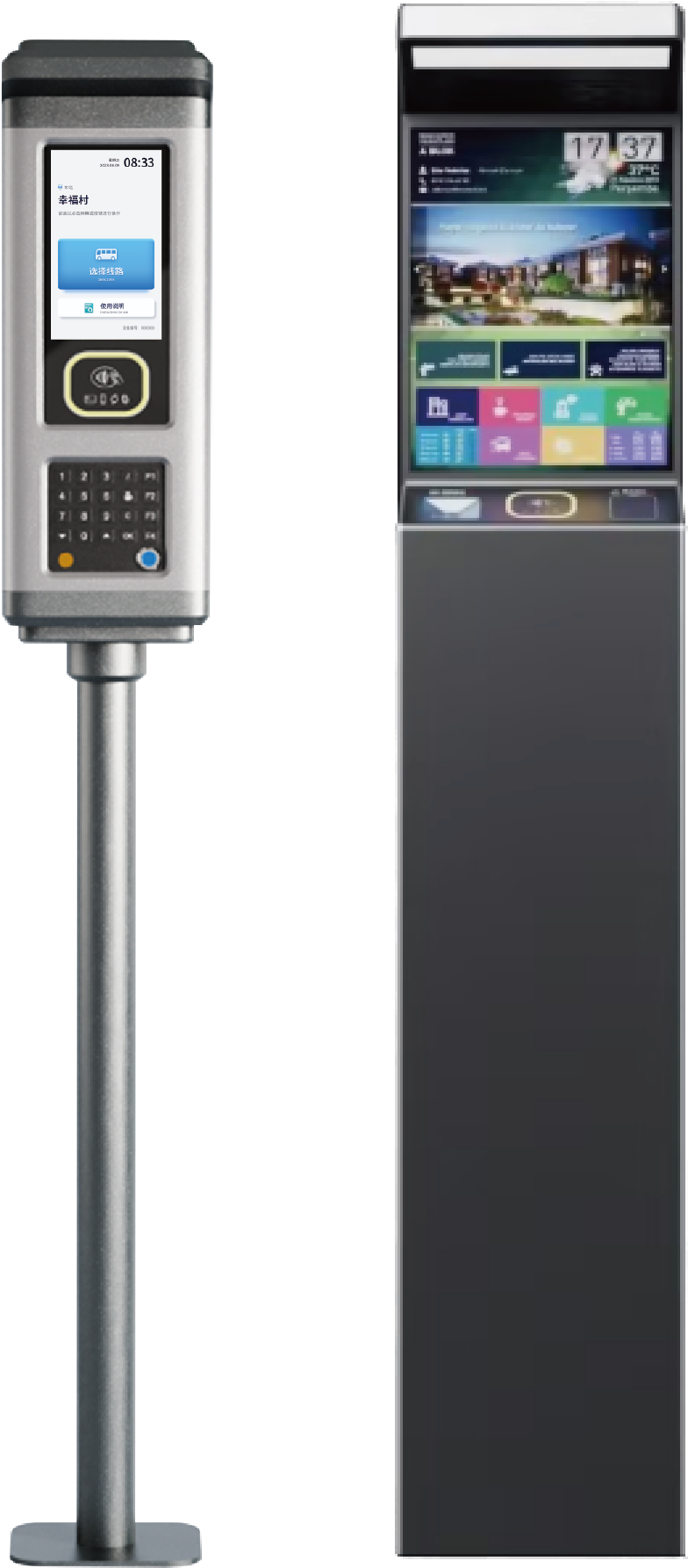

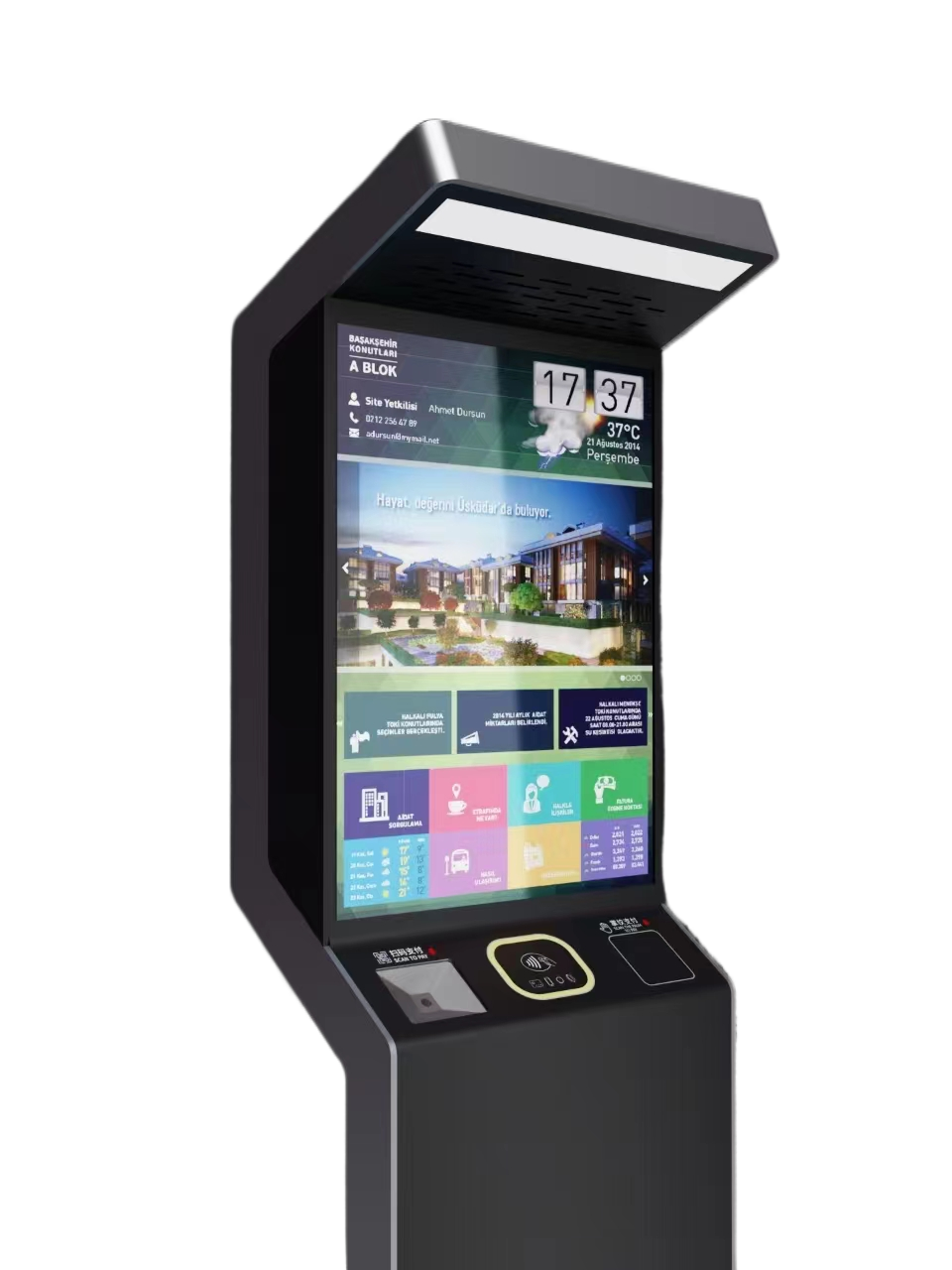
Cov khoom kho vajtse:Cov tswv yim ntse booking
1.Customized rau booking kev lag luam scenarios, kev ua haujlwm txawb kev them nyiaj thiab QR Code Scanning.
2. Tsa rau kev thov sab nraum zoov, kev sib ntsib ua si sab nraum zoov siv.
3. Siv cov ntsiab lus tseem ceeb lub zog, nrog kev xaiv ntxiv cov roj teeb hluav taws xob hom.
4.asal installation yam tsis muaj kev khawb, ua kom zoo dua qub.
5.Based ntawm Android operating system nrog lub zog ua tiav, nws sib xyaw ua ke ICE, thiab txhawb nqa IC daim npav, daim npav rho nyiaj thiab ntau dua.