

Soj Ntsuam Kev Them Nyiaj
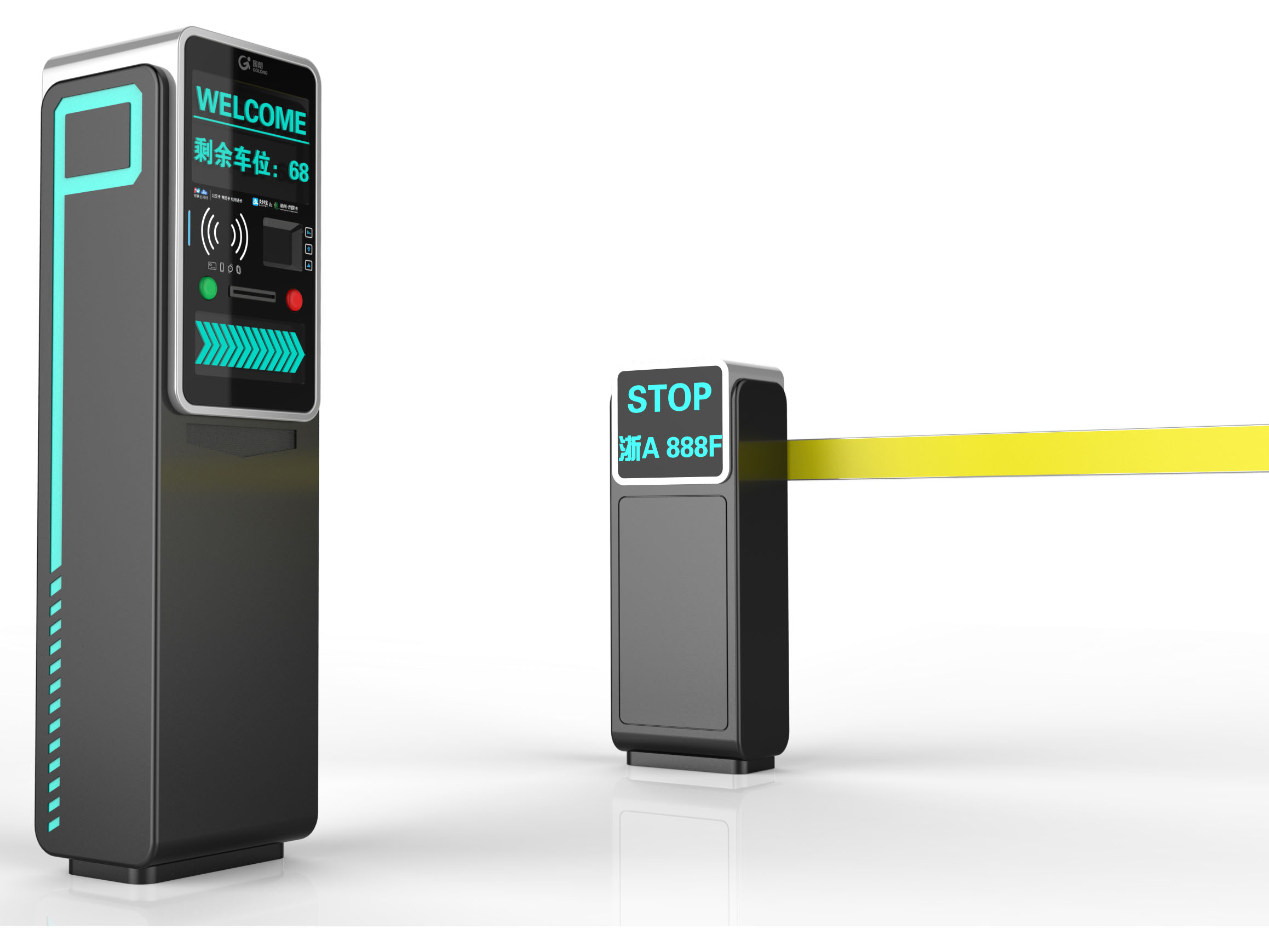
Tshuab - Golong txhua - hauv - ib lub tshuab them nyiaj
Golong Technology tsom rau kev lag luam - Kev them nyiaj pib qib, thiab cov nyiaj them xov tooj ntawm tes yuav coj cov tsav tsheb ib hom - Tshiab Kev Pab Nyiaj Tshiab. Thaum cov neeg siv dhau los ntawm lub chaw nres tsheb Toll, cov kab ke ntawm cov ntaub ntawv xov xwm. Cov neeg siv tuaj yeem xaiv Alipay, WeChat them nyiaj, Unionpay ceev ceev, thiab lub hnab nyiaj unispay QR code them nqi. Kev them nyiaj online online cuam tshuam nrog nyiaj ntsuab, kev siv nyiaj tsis txaus, txhim kho kev ua kom yooj yim rau cov neeg siv, thiab txuag lub sijhawm.
Siv kev them nyiaj mobile yog yooj yim, yooj yim, thiab nrawm!
- Nco ntsoov kev ncua deb ntawm Golong Smart Scanner yog 0.1 - 1.5 meters
- Thaum cov tsav tsheb tawm ntawm qhov chaw nres tsheb, lawv tuaj yeem qhia lawv lub xov tooj ntawm tes rau scan them nyiaj thiab dhau mus dhau!
- Tsis Muaj Kev Them Nyiaj Them
- Tshuab - Tsis - Tso Nyiaj Them Nqi
Nrog rau cov nrov ntawm lub tsheb lees paub ntau hauv chaw nres tsheb, kev siv thev naus laus tsheb tau dhau los ua kev nce qib, thiab kev lees paub meej tau tsim kho kom zoo. Daim ntawv thov ntawm tsheb lees paub hauv chaw nres tsheb ntau muab lub hauv paus rau cov neeg tsis suav -.
- Siab - Txhais Daim Ntawv Tso Cai Phaj Daim Ntawv Pom Zoo
- Siv tag nrho cov - Hauv -
- Siv lub dual - network card hom kom zoo kawg li kev daws tau dual - network kev xa khoom thiab kev rho tawm cov teeb meem hauv qhov siab - Txhais tau tias era.
- Ua haujlwm ib qho 3 - Megapixel koob yees duab kom ua tau zoo tau raws li Pixel yuav tsum muaj daim ntawv tso cai phaj lees paub thiab kab khiav thiab kab kev saib xyuas.
- Ua ke cov duab tau thiab paub txog kev ua tiav rau hauv qhov ntse siab - Cov lus txhais ua daim ntawv tso cai.
- Muab cov ntsiab lus siab rau cov kev ua kom pom tseeb ntawm lub tsheb pem hauv ntej.
- Feature Daim ntawv tso cai muaj daim npav muaj daim phiaj kev lees paub thiab muaj kev ywj pheej siab.
Siv cov duab siab heev txuam nrog algorithms
Tshuab - Tsis Them Nyiaj (1)
- Nkag mus rau nplooj ntawv them nyiaj los ntawm scanning ib tus lej
- Kev Daim Ntawv Tso Cai Daim Ntawv Tso Cai Phaj Ntaub Ntawv
- Khij cov kev txiav txim uas tsim nyog
- Them thiab tawm
- Tshuab - Tsis - Tso Nyiaj Them Nqi
- Cov neeg siv koom nrog cov tsheb ua haujlwm platform
- Qhib tus password - Dawb
- Nkag mus rau qhov chaw nres tsheb
- Tau txais kev ceeb toom nkag
- Kev them nyiaj yuav txiav tawm thaum tawm
- Qhia cov neeg siv thaum ncav cuag,Ua tiav tiav
- Cia cov chaw nres tsheb yam tsis tau nres.
- Daim Ntawv Tso Cai tau raug lees paub,Caw cov kev txiav tawm, tsav ntawm chaw nres tsheb ntau.
Cov cuab yeej daws teeb meem ntau ntau cov tshuaj yooj yim, ruaj khov, thiab qib siab - Cov qauv network los ua kom muaj teeb meem kev ntsuas ntau qhov chaw nres tsheb. Nws tsim nyog muaj tsheb sib zog, ua kom ruaj khov, muaj kev nyab xeeb, thiab cov ntaub ntawv nrawm, thiab txhim kho cov neeg ua haujlwm tswj hwm cov neeg ua haujlwm.
Tus siv
Chaw Nres Tsheb Chaw Nres Tsheb Lub Hom Phiaj
Enterprise Backend Kev Tswj Xyuas
Kev Sau Nyiaj Ntawv
- Huab Pab Tswj Platform
- Kev Pabcuam Lag Luam
- Cov ntaub ntawv tsuas thiab pauv
- Cov ntaub ntawv tshem tawm thiab kev sib haum xeeb
- Tej thaj chaw deb chaw saib xyuas kev saib xyuas
- Chaw Nres Tsheb Loj
Chaw Nres Tsheb Chaw Nres Tsheb
Cov ntawv tso cai, POLIFFER lees txais txhua - Hauv - Ib Tshuab
- Golong Smart Chaw Nres Tsheb
- Txawb app
- Chaw Nres Tsheb Chaw Nres Tsheb
- Kev thaiv kev cia li sawv
- Kev vam meej tshwj tseg
- VIP tau txais SMS
- Gates cia li tso tawm.
- Txais tos cov tshuaj ntsuam kom ua kom cov chaw nres tsheb
- Teeb Meem Txiav Tawm.
- VIP nres
- Tau Txais SMS
- Ntau txoj kev them nyiaj
- Hloov Tsheb Tshawb Nrhiav Tsheb
- Chaw Nres Tsheb Chaw Nres Tsheb
- Chaw nres tsheb nres tsheb
- Nrhiav Chaw Nres Tsheb
- Nrhiav Chaw Nres Tsheb
Chaw Nres Tsheb Chaw Nres Tsheb
Los ntawm GOLong Intellity Chaw nres tsheb nres tsheb, qhov chaw nres tsheb xis yog tsim, chaw nres tsheb mus nrhiav chaw nres tsheb, kev nres tsheb yooj yim, thiab tau txais cov kev taw qhia chaw nres tsheb. Lub kaw lus nthuav dav cov kev pabcuam xws li kev them nyiaj hauv tsheb rov qab rau cov nqi thauj khoom, suav nrog cov nyiaj them poob haujlwm, thiab cov micro - daim npav them nyiaj sai). Qhov kev daws teeb meem daws teeb meem los tsim Swift thiab Du cov chaw nres tsheb kom huv rau cov tswv tsheb, ua qhov kawg nres kev ua haujlwm.
Ua haujlwm hauv qhov system
- Diversified Them Txoj Kev, Cov Ntaub Ntawv wireless kis
- Cov khoom siv ua txhaum thiab kev tswj hwm tswb
- Tiag tiag - Sijhawm nres tsheb qhov chaw hloov pauv thiab cov kev taw qhia nres tsheb
- Chaw Nres Tsheb Chaw Nres Tsheb thiab Kev Nug
- Chaw Nres Tsheb Chaw Nres Tsheb
- Chaw Nres Tsheb Chaw Nres Tsheb
- Tus nqi - Ntxiv cov kev pabcuam
- Txav cov kev pab hauv online los ua kev tswj hwm hauv internet thiab kev sib sau ua haujlwm loj, txhim kho kev hloov pauv tus nqi online.
Ib qho kev them nqi them nqi raws li txawb cov apps thiab mini - Cov kev pab cuam txhawb ntau txoj kev them nyiaj xws li WeChat, Unynapay, thiab Daim Ntawv Tso Cai Phaj Them. Nws tshem tawm cov teeb meem xws li hloov chaw tsis txaus thiab qhov xav tau nyiaj, muab cov tsav tsheb nrog kev nplua nuj kev them nyiaj thiab txo kev nres tsheb congestion.
Cov Ntaub Ntawv Thov Cov Ntaub Ntawv
Muab cov ntawv teev tseg - Lub Sij Hawm Cov Lus Qhia Los Ntawm Txawb Cov Ntaub Ntawv thiab Mini - Cov Kev Ntsuam Xyuas Chaw Nres Tsheb Loj thiab tso lub Koom Haum Rau Cov Chaw Nres Tsheb Ntse.
Cov nqi lag luam - Cov kev pabcuam ntxiv
Siv cov ntaub ntawv LBS raws cov ntaub ntawv thiab cov ntaub ntawv nyob ib puag ncig, nrog rau cov neeg caij tsheb muaj nuj nqi, rau kev lag luam meej. Nthuav kev sib ntsib ua rau tsav tsheb 'thiab cov neeg caij tsheb' txawb thiab mini - Cov Kev Lag Luam, Cov Chaw Ncig Tebchaws Nyob Ze, Chaw Ncig Ua Si, thiab Kev Lag Luam Roj.
Tus nqi - Ntxiv cov ntaub ntawv
Cov tub lag luam
- Txhim kho qhov nkag thiab tawm ntawm cov qib ua haujlwm thiab cov tswj kev tswj hwm.
- Cov neeg siv tuaj yeem siv cov lus nug chaw nres tsheb ntxiv, chaw nres tsheb, thiab chaw nres tsheb navigation functions kom coj cov neeg yuav khoom ntws mus ua lag luam.
- Cov peev txheej ceev, tshem tawm cov teeb meem tshwm sim los ntawm nyiaj ntsuab.
- Txo cov nqi ua haujlwm thiab thaum kawg ua tiav kev ua haujlwm tsis tau ua.
Cov tub lag luam
Mobile app, virtual daim npav txheeb xyuas, yooj yim rau cov tub luam kom nkag siab cov qhua tuaj saib, thiab nthuav ntau cov kev pab;
Paub txog cov hom phiaj kev lag luam, thawb cov lus luv nqi.
Tus siv
- Tsis tas yuav muaj kev them nyiaj rau kev them nyiaj, txhim kho cov neeg siv kev paub ntawm cov neeg siv khoom;
- Yooj yim cheem cov nqi nres tsheb thiab cov luv nqi ntawm yuav;
- Seem chaw nug chaw nug, chaw nres tsheb, thiab chaw nres tsheb mus navation; Dawg nres tsheb lub sijhawm;
- Txaus siab rau cov nyiaj cheb ntawm chaw nres tsheb them tus nqi thiab them nyiaj ntxiv;
Cov chaw taws teeb pom ntawm cov ntawv qiv nyiaj thiab sib qhia ntawm cov ntaub ntawv ua lag luam tshiab
Ntse Gard Lub Rooj Tsav Tsheb
Cov neeg siv tuaj yeem xa lawv cov npav nkag tau ntawm cov chaw nkaum. Tom qab ua los ntawm lub tshuab POS, tus nqi nres tsheb yuav raug tso tawm. Cov neeg siv tau xaiv them siv alipay, WeChat them nyiaj, Unionpay ceev nrawm, thiab lwm txoj kev them nyiaj. Kev them nyiaj online tshem tawm cov hassle ntawm kev lag luam nyiaj txiag thaum enteriling tiag tiag - sijhawm ua haujlwm siab thiab kev tswj hwm kom muab cov tshuaj zoo meej.
Taw qhia rau chaw nres tsheb them cov tshuab
Chaw nres tsheb them cov khoom them nqi tau ua ib qho tseem ceeb ntawm kev tswj hwm hauv nroog niaj hnub no, txhawb kev tswj hwm chaw nres tsheb hauv Bustling nroog thiab thaj chaw nyob. Cov khoom siv no tsis tsuas yog siv cov txheej txheem ntawm kev them rau chaw nres tsheb tab sis kuj txhim kho kev ua haujlwm thiab cov qhua tuaj noj mov. Raws li cov nroog loj hlob thiab cov tsheb khiav tsheb ntau ntxiv, qhov tseem ceeb ntawm cov kev hloov chaw nres tsheb ua haujlwm tiav. Hauv tsab xov xwm no, peb delve mus rau hauv kev ua haujlwm ntawm chaw nres tsheb them cov tshuab thiab tshawb seb lawv ua li cas yav tom ntej ntawm kev tswj hwm hauv nroog loj.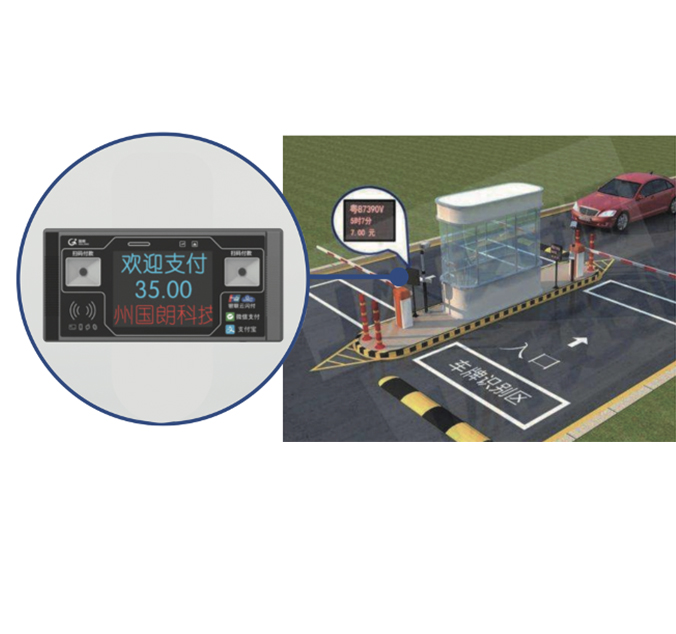
Hom Chaw Nres Tsheb Them
Chaw nres tsheb them cov khoom them cov tshuab tuaj hauv ntau hom, txhua qhov catering rau cov neeg siv kev xav tau thiab thev naus laus zis. Tsoos npib - Cov tshuab ua haujlwm tseem ceeb tau nthuav dav hauv ntau thaj chaw, muab kev yooj yim thiab kev ntseeg tau yooj yim. Raws li thev naus laus zis siab dua, credit card - enabled tshuab qhib ntau dua, tso cai rau cov neeg siv khoom los ntawm kev nrawm lossis tso lawv daim npav. Cov kev xaiv tsis sib haum, suav nrog cov cuab yeej siv, muab cov cuab yeej siv tau yooj yim, txo lub sijhawm kev hloov pauv thiab txhim kho cov neeg siv kev paub. Kev lag luam wholesaleThem Txoj Kev Chaw Nres TshebCov kev xaiv sib txawv, thiab txoj cai xaiv feem ntau yog nyob ntawm qhov chaw xws li thaj chaw, cov ntim ntawm kev siv, thiab cov kev txwv nyiaj txiag.Siv thev naus laus zis tom qab Chaw Them Nyiaj Them Nqi
Qhov ua tau zoo ntawm chaw nres tsheb them cov tshuab dag nyob rau hauv lawv cov txheej txheem thev naus laus zis thev naus laus zis. Ntawm qhov tseem ceeb ntawm cov kab ke no yog cov software txhim kho uas tswj kev lag luam thiab muab cov neeg siv - cov phooj ywg interfaces. Cov cav tov no feem ntau xav tau kev siv lub peev xwm loj los txuas nrog rau kev ua haujlwm hauv nruab nrab rau kev ua lag luam pov thawj thiab kev sau cov ntaub ntawv. Kev sib koom ua ke ntawm IOT (internet ntawm tej yam) thev naus laus zis tau hloov dua tshiab no, ua rau kev soj ntsuam tiag tiag - thiab hloov tshiab. Them cov txheej txheem nres tsheb txuas ntxiv mus txuas ntxiv kom ua tiav cov thev naus laus zis tshiab, kom ntseeg tau tias cov tshuab no yog ob qho tib zoo.Yuav siv li cas siv cov khoom siv them nqi nres tsheb
Siv lub tshuab them nyiaj nres tsheb yog feem ntau yog ib qho txheej txheem ncaj qha. Cov neeg siv ua si lawv cov tsheb, nrhiav lub tshuab nyob ze tshaj plaws, thiab ua raws li cov lus qhia - vijtsam tau pib ua kev sib pauv. Feem ntau cov tshuab xav tau cov neeg siv nkag mus rau hauv lawv daim npav tsav tsheb lossis tus lej nres tsheb. Cov neeg siv ces xaiv lub sijhawm ntawm lawv cov nyob thiab npaj mus them nyiaj. Cov cav tov tsim los ntawm cov chaw nres tsheb txoj kev yuav txais ntau hom kev them nyiaj, suav nrog cov nyiaj, daim npav rho nyiaj, thiab txawm them nyiaj txiag. Cov lus qhia meej thiab kev txawj ntse interfaces xyuas kom meej tias cov kab ntawv no siv tau rau txhua lub hnub nyoog thiab kev siv txuj ci.Cov Nta Kev Ruaj Ntseg Hauv Chaw Nres Tsheb Them
Kev ruaj ntseg yog qhov tseem ceeb hauv kev tsim qauv thiab ua haujlwm ntawm chaw nres tsheb cov tshuab them. Niaj hnub nimno Systems txuas ntau yam tiv thaiv ntau yam anti - Kev dag dag xws li encryption los tiv thaiv cov ntaub ntawv cov neeg siv thiab cov ntaub ntawv hloov chaw. Kev siv cov kev sib txuas lus ruaj ntseg raws cov ntaub ntawv ua kom cov ntaub ntawv kis tau ntawm cov tshuab thiab cov servers tseem tsis pub leej twg paub thiab tsis pub lwm tus paub thiab tsis pub lwm tus paub thiab tsis pub lwm tus paub thiab. Tsis tas li ntawd, cov cav tov kom muaj TAMPER - Tiv thaiv cov qauv thiab - sijhawm saib xyuas lub peev xwm. Them Txoj Kev Chaw Nres Tsheb Lub Chaw Haujlwm Saib Xyuas Qhov Chaw Ruaj Ntseg ua rau cov neeg muaj kev ruaj ntseg thiab cov ntaub ntawv ua txhaum cai, muab kev thaj yeeb nyab xeeb rau cov neeg siv thiab cov tub ceev xwm hauv zos ib yam nkaus.Kev sib xyaw nrog them nyiaj txawb thiab apps
Kev Tawm Tsam ntawm Cov Nyiaj Them Mobile thiab cov ntawv thov tau ntxiv qhov loj me me rau cov khoom siv them chaw nres tsheb. Kev sib xyaw nrog cov neeg siv txawb tso cai rau cov neeg siv them rau chaw nres tsheb khiav rov qab, txuas ntxiv lawv lub chaw nres tsheb ntev, thiab tau txais cov ntawv ceeb toom txog lub sijhawm tas sij hawm. Qhov kev sib koom ua ke no ntawm cov kev them nyiaj ib txwm muaj thiab txawb niaj hnub thev naus laus zis txhim kho kev yooj yim thiab hloov tau yooj yim. Ntxiv mus, cov kev them nyiaj digital them nyiaj seamless cov kev paub, txo kev vam khom ntawm lub cev txiaj thiab nrawm nrawm. Lag luam wholesale them txoj kab kev nres tsheb cov chaw nres tsheb tam sim no feem ntau suav nrog cov haujlwm no, muaj kev hloov kho cov neeg siv khoom rau cov kev daws digital.Kev Txij Nkawm thiab Kev Nyuaj Siab
Txawm hais tias lawv muaj kev pab ntau ntau, nres tsheb them tej yam kev tu thiab kev nyuaj siab. Cov teeb meem tshwm sim suav nrog kho vajtse malfunctions, cov network ua tsis tiav, thiab software glitches. Kev saib xyuas ib txwm yog qhov tseem ceeb los xyuas kom meej tias cov tshuab ua haujlwm thiab muaj rau cov neeg siv txhua lub sijhawm. Them Txoj Kev Chaw nres tsheb chaw nres tsheb ua si lub luag haujlwm tseem ceeb hauv kev muab kev pab txhawb thiab tu cov kev pabcuam txuas ntxiv. Qhov no suav nrog kev hloov kho software ib txwm, kho vajtse kho vajtse, thiab cov neeg siv txhawb qib kev pib. Hais txog cov kev cov nyom no yog qhov tseem ceeb kom txo qis downtime thiab tswj cov qauv kev pab siab rau hauv nroog loj hauv nroog.Qhov Zoo Ntawm Cov Chaw Them Tsheb
Cov kev them nyiaj tsis pub dhau cov chaw nres tsheb muaj ntau cov txiaj ntsig zoo, ob qho tib si rau cov neeg siv thiab cov thawj coj hauv nroog. Los ntawm kev txo qhov xav tau rau kev cuam tshuam kev cuam tshuam, cov kev ua haujlwm no hloov chaw nres tsheb thiab txhim kho kev ua haujlwm. Cov neeg siv tau txais txiaj ntsig sai thiab kev yooj yim dua, thaum lub sij hawm hauv nroog tuaj yeem ua kom tau txais kev sib sau nyiaj tau los ntawm cov nyiaj tau los siv tau. Ib qho ntxiv, cov tshuab tsis zoo ntxiv txo qhov peev xwm rau tib neeg kev ua yuam kev thiab cov neeg ua haujlwm pub dawb rau lwm cov haujlwm. Them Txoj Kev Chaw nres tsheb txoj kab kev lag luam yuav txuas ntxiv ua kom ntau tshaj qhov txiaj ntsig thiab ua tau raws li kev hloov zuj zus ntawm cov nroog thiab cov zej zog.Yav Tom Ntej Cov Qauv Hauv Chaw Nres Tsheb
Qhov chaw nres tsheb kev lag luam yog poised rau kev hloov zuj zus ntxiv raws li cov thev naus laus zis tshiab. Kev them nyiaj tsis taus, twb muaj ntau ntxiv, yuav dhau los ua cov tseem ceeb, tsav los ntawm cov neeg siv khoom thov kom nrawm thiab yooj yim. Ntxiv mus, kev txawj ntse ntse thiab tshuab kev kawm tau tuav lub peev xwm los txhim kho kev twv xyuas cov khoom lag luam thiab cov neeg siv tus kheej. Kev tshuaj xyuas kev tshuaj xyuas tuaj yeem ua rau cov qauv sib tw zoo, ua kom zoo rau kev siv thiab cov nyiaj tau los. Them cov chaw nres tsheb khiav mus rau kev tshawb nrhiav thiab kev tsim kho kom nyob ntawm qhov ua ntej ntawm cov qauv no, kom lawv cov kev daws teeb meem tau txiav - Ntug thiab ua tau zoo.Ib puag ncig thiab kev lag luam cuam tshuam ntawm cov chaw nres tsheb
Chaw nres tsheb cov nyiaj nres tsheb tuaj yeem muaj kev cuam tshuam tseem ceeb thiab kev lag luam muaj kev cuam tshuam. Los ntawm kev txo qhov kev xav tau ntawm daim pib thiab cov ntawv txais nyiaj, cov tshuab no pab txhawb rau kev siv zog ruaj khov. Qhov hloov pauv ntawm cov nyiaj them rau digital thiab tiv tauj kom tsis muaj kev tiv thaiv ib puag ncig cuam tshuam nrog txiaj ntau lawm thiab tuav. Kev lag luam, cov chaw nres tsheb muaj txiaj ntsig tsim cov kwj deg khov kho rau cov khoom plig los rau cov chaw hauv nroog thiab cov cheeb tsam lag luam. Them Txoj Kev Chaw nres tsheb nres tsheb muab cov khoom siv hluav taws xob tseem ceeb uas txhawb nqa kev lag luam hauv nroog los ntawm kev txhawb nqa hauv nroog los ntawm kev txhawb nqa hauv nroog los ntawm kev ua kom yooj yim thiab yooj yim hauv nroog loj.Customite Compints:Lub taub dej
Tsim nyob rau hauv 2015, golong tsom rau kev thauj mus los rau pej xeem kev sib sau ua ke thiab kev siv ntawm Internet cov ntaub ntawv cov khoom lag luam thiab cov kev pabcuam. Pom tau rau nws cov thawj coj hauv Is Taws Nem ntawm yam, ntsej muag kev them nyiaj, cov khoom siv mus ncig, golong yog prime drivation ntawm kev hloov tshiab hauv cov haujlwm no. Nrog nws cov hauv paus hauv Hangzhou, lub tuam txhab tau nthuav dav nws mus txog thaj chaw ua tau zoo thiab txuas ntxiv txhim kho cov kev ua tau zoo thiab ua haujlwm ntawm kev them nyiaj thoob ntiaj teb thoob ntiaj teb.