

Koj tuav kas fes, sib tham ntev ntev, tom qab ntawd ntsib tus thawj coj sib ntaus sib tua: nrhiav seb yuav ua li cas thiaj li siv tau koj daim pib nres tsheb ua ntej lub rooj vag ntxiab kaw thiab cov kab hauv qab koj pib lub suab nkauj ntawm honks.
Txhawm rau zam qhov ua yeeb yam, kawm paub txog kev siv qhov chaw nres tsheb niaj hnub no ua haujlwm li cas, los ntawm kev luam theej duab barcode mus rau daim ntawv tso cai daim ntawv lees paub, yog li koj tuaj yeem hla dhau los ntawm kev tawm zoo li tus pro-rov qab los ntawm kev tshawb pom ntawm qhov chaw nres tsheb ntse los ntawmFederal Highway Administration.
🚗 Txheej txheem cej luam ntawm validate qhov chaw nres tsheb daim pib system thiab lawv lub hom phiaj tseem ceeb
Txheeb xyuas cov npav nres tsheb taug qab txhua lub tsheb nyob, txuas rau kev them nyiaj lossis txo nqi, thiab tswj lub rooj nkag mus. Lawv txo qis kev ua haujlwm ntawm phau ntawv thiab tiv thaiv kev poob nyiaj.
Lawv pab cov khw, chaw ua haujlwm, thiab tshav dav hlau muab kev nkag mus thiab tawm tau yooj yim, sib txuas ntau txoj kev them nyiaj, thiab sau cov ntaub ntawv meej meej ntawm kev xav tau chaw nres tsheb thiab tus cwj pwm qhua.
1. Cov ntsiab lus tseem ceeb ntawm kev siv tau qhov system
Kev teeb tsa validation niaj hnub txuas cov khoom siv nkag, cov chaw them nyiaj, cov ntsiab lus siv tau, thiab tawm cov neeg nyeem los ntawm ib lub hauv paus platform.
- Nkag mus terminals teeb meem barcoded lossis RFID daim pib
- Kev them nyiaj kiosks thiab POS cov cuab yeej txais ntau hom kev them nyiaj
- Cov neeg rau zaub mov khaws daim pib ID, lub sijhawm nyiaj muas noj, thiab cov cai them nqi
- Exit terminals paub meej tias kev them nyiaj lossis kev lees paub ua ntej qhib rooj vag
2. Lub hom phiaj tseem ceeb rau cov neeg tsav tsheb thiab cov neeg tsav tsheb
Lub kaw lus yuav tsum ua haujlwm rau cov neeg ua haujlwm thiab cov neeg tsav tsheb tib lub sijhawm, txhawb kev khiav ceev thiab meej tus nqi.
| Lub Hom Phiaj Operator | Cov txiaj ntsig tsav tsheb |
|---|---|
| Tus nqi raug xam | Ncaj ncees, pob tshab tus nqi nres tsheb |
| Fast throughput | Cov kab luv luv ntawm cov rooj vag |
| Tsawg kev dag | Kev nyab xeeb, kev ntseeg siab ntawm chaw nres tsheb |
| Cov ntaub ntawv nkag siab | Qhov chaw zoo dua |
3. Kev koom ua ke nrog kev them nyiaj kho vajtse
Kev ntseeg tau zoo yog nyob ntawm cov khoom siv them nyiaj ruaj khov uas ua haujlwm 24/7 thiab txhawb nqa ob leeg siv thiab tsis tuaj koom.
- Cov khoom siv ceev ceev (GL - POS - G100)tuav ceev rooj vag muas
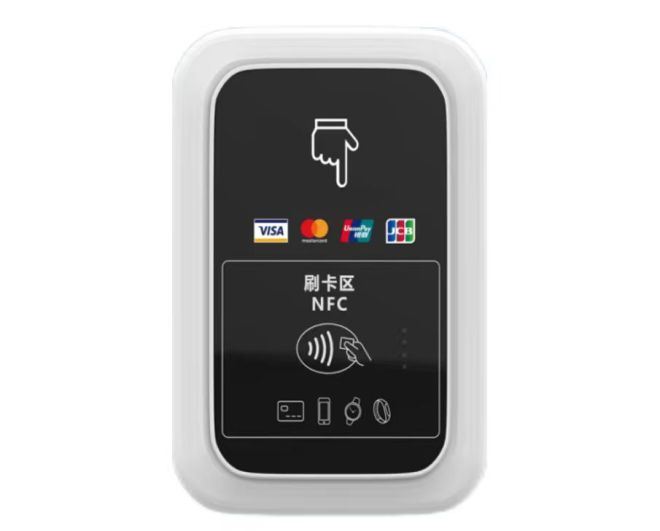
- Kev thauj pej xeem tag nrho - them nyiaj npib lub thawvtxhawb nyiaj ntsuab thiab npib
- Unattended Payment Terminal SMART HIGH QUALITY RETAIL POS M100enables tus kheej-kev pab them nqi
4. Cov txiaj ntsig kev ua haujlwm rau cov chaw sib txawv
Cov chaw sib txawv siv cov logic zoo sib xws tab sis kho cov nqi them nqi thiab kev ua haujlwm kom phim lawv cov neeg tuaj saib thiab cov qauv tsheb.
| Hom chaw | Hom tsom xam |
|---|---|
| Cov khw muag khoom | Dawb lossis luv nqi teev rau cov neeg siv khoom |
| Tsev kho mob | Cov neeg mob thiab cov neeg ua haujlwm tso cai |
| Chaw ua haujlwm | Cov ntawv hla txhua hli thiab cov qhua siv tau |
| Tshav dav hlau | Tiered pricing thiab tswj kev nyob ntev |
🧾 Cov txheej txheem ib ntus los ntawm kev muab daim pib mus rau qhov chaw nres tsheb ua tiav
Los ntawm kev nkag mus rau kev tawm, txhua kauj ruam teev sijhawm thiab tus kheej, tom qab ntawd txuas nws mus rau cov cai rau tus nqi, kev lees paub, thiab kev them nyiaj zaum kawg.
Cov kauj ruam meej txo qhov tsis meej pem ntawm cov ntsiab lus them nyiaj, txiav tawm qhov ncua sij hawm, thiab ua kom yooj yim rau kev txheeb xyuas cov nyiaj tau los thiab kho cov nqi them nqi.
1. Daim pib tsim thaum nkag
Thaum lub tsheb tuaj txog, lub davhlau ya nyob twg tsim ib daim pib tshwj xeeb lossis token, tom qab ntawd khaws lub sijhawm thiab txoj kab ID hauv nruab nrab.
- Tus tsav tsheb nias ib lub pob lossis kais ib daim npav
- System muab ib daim ID thiab lub sij hawm stamp
- Lub rooj vag qhib tom qab tau txais kev pom zoo
2. Kev siv tau thiab suav nqi
Ua ntej tawm mus, lub kaw lus tshawb xyuas lub sijhawm nyob thiab siv cov nyiaj cheb lossis cov sijhawm pub dawb los ntawm cov tub lag luam lossis cov thawj coj hauv tsev.
| Tswv yim | Piv txwv |
|---|---|
| Lub sijhawm nkag thiab tawm | 09:02–11:10 dr hab |
| Lub sijhawm dawb | Thawj 2 teev dawb |
| Txoj cai luv nqi | Khw muag khoom stamp = 50% tawm |
| Tus nqi kawg | Txo nqi tom qab kev cai |
3. Kev tso cai them nyiaj thiab tawm
Tom qab siv tau, cov neeg tsav tsheb them nyiaj ntawm kev them nyiaj - on- ko taw kiosks lossis tawm cov chaw nres tsheb. Lub kaw lus ces khij daim pib raws li them thiab xa ib lub teeb liab qhib rau qhov thaiv.
- Tus neeg tsav tsheb luam daim pib lossis daim npav tus lej
- Qhov system qhia tus nqi thiab lees txais kev them nyiaj
- Them nyiaj raws li txoj cai syncs rau kev tawm txoj kab
4. Kev txheeb xyuas cov ntaub ntawv thiab kev ua haujlwm taug qab
Cov neeg ua haujlwm tshuaj xyuas cov ntaub ntawv siv los txhim kho kev teeb tsa, tus nqi, thiab kev tso chaw kho vajtse, siv cov cuab yeej pom kev kom nkag siab sai.
💳 Yuav ua li cas barcode, QR, thiab RFID technologies pab kom ruaj ntseg daim pib validation
Barcode, QR, thiab RFID thev naus laus zis muab txhua daim pib ua tus cim tshwj xeeb, uas lub kaw lus tuaj yeem nyeem sai, txheeb xyuas, thiab txuas mus rau keeb kwm kev them nyiaj.
Lawv txo qhov yuam kev ntawm phau ntawv nkag thiab ua kom ceev cov tsheb khiav ntawm txoj kab tsis khoom nkag thiab tawm.
1. Daim pib barcode
Barcodes khaws ib daim ID luv luv uas cov neeg nyeem tuaj yeem luam theej duab sai, txawm tias daim pib nqi qis.
- Tsawg nqi luam ntawv
- Ib qho yooj yim kev koom ua ke nrog POS uas twb muaj lawm
- Haum rau kev nyob luv luv thiab khw muag khoom chaw nres tsheb
2. QR code validation
QR cov lej tuav cov ntaub ntawv ntau dua, yog li cov tshuab tuaj yeem embed lub sijhawm, qhov chaw ID, lossis cov ntsiab lus nkag ncaj qha rau hauv daim ntawv luam lossis daim pib digital.
| Feature | Cov txiaj ntsig |
|---|---|
| Cov ntaub ntawv muaj peev xwm siab | Txhawb kev ruaj ntseg ntxiv |
| Nyeem tau hauv xov tooj | Txhawb app-based validation |
| Durable luam ntawv | Ua haujlwm txawm tias muaj kev puas tsuaj me me |
3. RFID thiab contactless media
RFID phaib lossis cov cim npe tso cai rau kais-thiab-mus nkag tsis tau luam ntawv, uas yog qhov zoo tagnrho rau cov neeg ua haujlwm lossis cov neeg siv nquag.
- Fast, hands-free access
- Txhawb cov ntawv hla txhua hli lossis txhua xyoo
- Nyuaj rau luam dua daim pib daim ntawv
🛡️ Kev ua yuam kev, kev tiv thaiv kev dag ntxias, thiab cov ntaub ntawv kev nyab xeeb hauv kev siv tau
Cov txheej txheem kev lees paub muaj txiaj ntsig suav nrog kev ua yuam kev muaj zog, kev txheeb xyuas kev dag ntxias, thiab kev zais zais los tiv thaiv cov nyiaj tau los thiab cov neeg siv cov ntaub ntawv.
Lawv kuj khaws cov cav kom meej kom cov neeg ua haujlwm tuaj yeem taug qab cov xwm txheej thiab daws cov neeg siv khoom tsis sib haum sai.
1. Tuav cov neeg siv thiab cov cuab yeej yuam kev
Lub kaw lus qhia cov neeg ua haujlwm thiab cov neeg tsav tsheb thaum kho vajtse lossis daim pib ua tsis tiav, tsis txhob tos ntev.
- On-screen prompts rau unreadable tickets
- Rov qab mus rau phau ntawv phaj nkag
- Tsis siv neeg qhov xwm txheej kaw rau kev txhawb nqa
2. Cov tswv yim tiv thaiv kev dag ntxias
Cov cuab yeej tiv thaiv kev dag ntxias ua rau nws nyuaj rau rov siv dua lossis daim pib cuav thiab tiv thaiv cov neeg ua haujlwm lossis kev tsim txom tsav tsheb.
| Txaus ntshai | Tswj |
|---|---|
| Daim pib rov siv dua | Ib zaug validation chij nyob rau hauv database |
| Cloned media | Encrypted IDs thiab checksums |
| Cov neeg ua haujlwm yuam kev | Lub luag haujlwm-raws li kev nkag mus thiab tshawb xyuas txoj hauv kev |
3. Cov ntaub ntawv kev ruaj ntseg thiab ua raws
Cov neeg ua haujlwm tiv thaiv cov neeg siv cov ntaub ntawv los ntawm kev siv cov tes hauj lwm ruaj ntseg, cov cai nkag mus tau nruj, thiab kev thaub qab tsis tu ncua.
- Kev sib txuas lus encrypted ntawm cov khoom siv thiab server
- Txwv cov nyiaj admin nrog cov passwords muaj zog
- Kev tuav pov hwm txoj cai rau cov cav thiab cov ntaub ntawv them nyiaj
🏢 Vim li cas cov chaw xaiv Golong tshuab rau kev siv tau daim pib nres tsheb
Golong cov kev daws teeb meem sib txuas cov khoom siv ruaj khov, kev them nyiaj hloov pauv tau yooj yim, thiab muaj kev ruaj ntseg ruaj ntseg kom cov chaw nres tsheb ruaj khov thiab muaj txiaj ntsig.
Lawv tau tsim rau cov chaw tsheb loj uas xav tau kev ua haujlwm sai thiab kev sib koom ua ke yooj yim nrog cov tshuab uas twb muaj lawm.
1. Kev ua haujlwm siab thiab lub sijhawm ua haujlwm
Golong cov khoom siv yog tsim los rau kev ua haujlwm tsis tu ncua hauv ib puag ncig hnyav nrog kev siv ntau zaus.
- Industrial-qib Cheebtsam
- Kev ua lag luam ceev ceev
- Tej thaj chaw deb saib xyuas thiab kuaj mob
2. Kev them nyiaj yooj yim thiab kev xaiv kev koom ua ke
Golong txhawb nqa daim npav, nyiaj ntsuab, hnab nyiaj hauv xov tooj, thiab cov nyiaj, yog li cov neeg siv khoom tuaj yeem phim cov neeg siv khoom hauv zos.
| Muaj peev xwm | Kev tshwm sim |
|---|---|
| Kev them nyiaj yug ntau | Kev them nyiaj tiav ntau dua |
| Qhib APIs | Ib qho yooj yim txuas mus rau qhov chaw nres tsheb software uas twb muaj lawm |
| Modular tsim | Scales nrog qhov chaw loj hlob |
3. Pov thawj siv nyob rau hauv ntau yam xwm txheej
Los ntawm cov chaw nres tsheb hauv khw muag khoom mus rau cov chaw thauj mus los, Golong systems pab txo cov kab thiab khaws cov nyiaj tau los ruaj ntseg.
- Khw muag khoom thiab lom zem complexes
- Kev thauj pej xeem thiab chaw nres tsheb thiab caij tsheb
- Corporate campuses thiab industrial parks
Xaus
Validate qhov chaw nres tsheb daim pib txuas nkag mus, validation, thiab them nyiaj rau hauv ib qho kev tswj xyuas. Lawv siv barcodes, QR, lossis RFID los taug qab txhua qhov kev mus ntsib thiab tiv thaiv cov nyiaj tau los.
Nrog cov cuab yeej muaj zog thiab cov software ntse, cov chaw tau txais txiaj ntsig sai dua, cov neeg siv khoom zoo dua, thiab cov ntaub ntawv meej meej rau kev txhim kho txuas ntxiv thiab kev txiav txim siab nqi.
Cov lus nug uas nquag nug txog kev siv tau daim pib nres tsheb
1. “validate parking ticket” txhais li cas?
Yuav kom siv tau daim pib nres tsheb txhais tau tias kom paub meej tias nws tsim nyog rau qhov chaw nres tsheb dawb lossis luv nqi, lossis tsuas yog kom paub meej tias them nyiaj ua ntej tawm hauv qhov chaw.
2. Lub khw yuav siv kuv daim pib li cas?
Lub khw scans koj daim pib barcode lossis QR code, tom qab ntawd xa daim ntawv pov thawj rau lub hauv paus system, uas hloov kho koj tus nqi ua ntej koj them lossis tawm.
3. Kuv puas tuaj yeem siv daim pib siv tau?
Tsis yog. Thaum lub kaw lus kos ib daim pib siv thiab lub tsheb tawm, daim pib ID yuav siv tsis tau. Kev sim rov siv dua feem ntau yuav ua rau muaj qhov yuam kev ntawm lub rooj vag.
4. Puas yog kuv cov ntsiab lus them nyiaj nyab xeeb hauv cov tshuab no?
Niaj hnub nimno systems siv encryption, ruaj ntseg tes hauj lwm, thiab nruj neeg siv kev tswj. Cov ntaub ntawv them nyiaj raug tiv thaiv thiab khaws cia raws li cov qauv thiab cov cai.
5. Yuav ua li cas yog lub tshuab nyeem tsis tau kuv daim pib?
Feem ntau cov chaw muab cov khawm pab lossis cov neeg ua haujlwm txoj kab. Cov neeg ua haujlwm tuaj yeem tshawb xyuas koj cov ntaub ntawv siv sijhawm, tus lej phaj, lossis phau ntawv nkag ntawm daim pib ID.