

Txhim kho kom yooj yim thiab ua tau zoo nrog peb lub tsheb npav nres muag khoom tshuab kev daws teeb meem
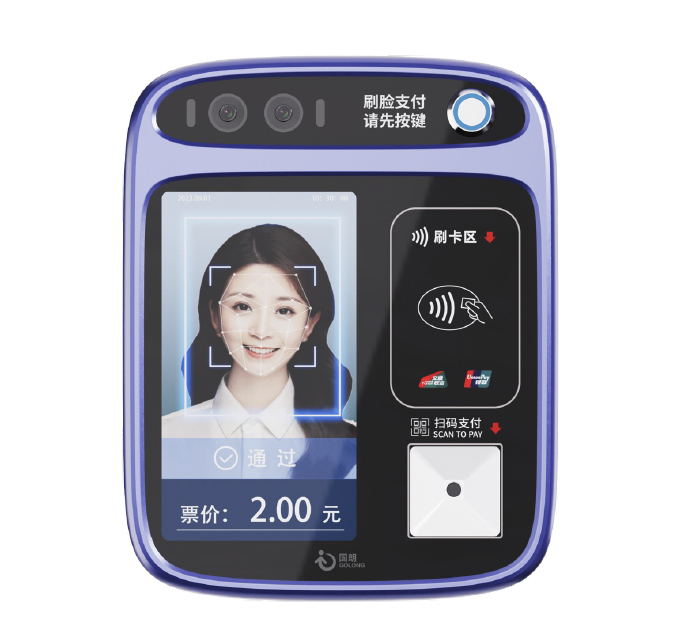
, Khoom Taw QhiaGL - Pos - A108 Txhua - Hauv - Ib Daim Ntawv Them Nyiaj Lub Tshuab. Qhov system no yog tsim ntawm daim npav tsim tshiab Swiping Module thiab ua tib zoo kho cov cim scanner tshiab. Lub tshuab tag nrho muaj cov qauv kev cog lus, zoo nkauj, thiab ua haujlwm zoo heev. Kev Pab Txhawb: Alipay, WeChat thiab lwm qhov thib peb thib peb - Kev Them Nyiaj Txiag; Unionpay daim npav ceev; Cov tub luam caij npav app QR cov cim; tau tshaj nrog cov npav IC twb muaj lawm; Tam sim no mobile NFC uas twb muaj lawm, yog li cov neeg siv kom yooj yim xaiv tau los ntawm ntau txoj kev them nyiaj los them kom muaj kev nyab xeeb thiab txaus siab rau koj lub tsheb thauj. |

二, platform technology |
| Chaw khaws ntaub ntawv | Lub kaw lus database siv cov ntawv qhia hauv Mysql ntawm lub neej, thiab qhia txog lub cav database, thiab qhia txog lub cav hluav taws xob rau cov ntaub ntawv tseem ceeb los txhim kho kev sau ntawv; |
| Kev Sib Txuas Lus Server | Qhov kev sib txuas lus server siv cov khoom sib txuas lus paub (cov khoom siv muaj zog thiab muaj peev xwm ua tau zoo); Nws siv cov khoom siv thev naus laus zis thev naus laus zis los txhim kho cov kev ua tau zoo thiab kev sib tw ntawm cov txheej txheem tom qab; |
| Cov Khoom Siv Hluav Taws Xob | Kev ua haujlwm database siv cov khoom siv nrov kom txhim kho cov haujlwm hauv kev ua haujlwm; |
| Asynchronous kev siv tshuab | Txais async asynchronous ua siv tshuab los txhim kho kev sib hais haum ua tiav kev ua tau zoo; |
| Peb - Tier Architecture | Lub nraub qaum kev tswj hwm adops ib peb - Txheej Architecture BS system los pab txhawb cov ntaub ntawv thov thiab nthuav; |
, Khoom Taw QhiaTxheem Tsheb 4.3 - Nti LCD Zaub. |
Nrog cov npav them nyiaj hauv tsheb npav Tsis tau, koj tuaj yeem twv farewell mus rau cov tsiaj ntev thiab hoatsle - kev hloov pauv. Tsim cov thev naus laus zis, peb kev daws teeb meem ua rau kev paub them nyiaj se, pub cov neeg muag khoom kom nrawm dua lawv cov nyiaj them. Hais zoo rau fumbling rau nyiaj ntsuab lossis tos rau daim pib muag, raws li peb txiav - ntug phaib, suav nrog kev tiv tauj kev them nyiaj, kev them nyiaj mobile, thiab ntau dua. Tsis tsuas yog peb lub tsheb npav nres lub tshuab muag khoom tau kho tshuab smoothhist kev lag luam, tab sis nws kuj txhim kho kev ruaj ntseg thiab pob tshab. Los ntawm kev tshem tawm qhov xav tau ntawm kev tuav nyiaj ntsuab, nws txo qis kev pheej hmoo ntawm kev tub sab thiab muaj ib puag ncig ruaj ntseg rau ob tus neeg caij tsheb thiab cov neeg khiav tsheb thauj khoom. Tsis tas li ntawd, peb lub cev ua ke sib txuas nrog koj cov cuab yeej cuab tam, ua rau kev saib xyuas tiag tiag - thiab cov ntaub ntawv tsom xam kom tau txais kev ua haujlwm zoo. Nqa koj lub npav nres kev paub rau qib tom ntej nrog cov tos txais tos chaw tsheb npav nres cov tshuab muag khoom. Puag lub neej yav tom ntej ntawm Smart tsheb thauj mus los thiab xyuas kom cov tsis tau - Kev taug txoj kev ywj pheej rau koj cov neeg caij tsheb. Kev ntseeg siab hauv peb cov kev tshaj lij, kev ntseeg tau, thiab kev cog lus kom muab cov kev daws teebmeem kev them nyiaj tshiab uas ua kom yooj yim dua thiab ua tau zoo rau cov neeg muag khoom thoob ntiaj teb. Nco tseg: Cov ntsiab lus tau muab saum toj no tshaj li cov lus suav tau thiab suav nrog cov ntsiab lus tseem ceeb thaum khaws cov ntaub ntawv muaj txiaj ntsig zoo thiab xa cov ntaub ntawv muaj txiaj ntsig txog cov khoom.
Featured khoom
-

Kev tsis saib xyuas them lub davhlau ya nyob twg Moti POS
-

Kev tsis saib xyuas them nqi Terminal Ntse Zoo Muag Pos M100
-
Npav lub ntsej muag thiab xibtes luam tawm ua ke
-

Blue Model Chaw Caij Tsheb Loj lees paub txhua - Hauv - Ib Lub Tshuab Them Nyiaj + Daim Npav ID
-

GL - Pos - A106 Public Transport All - Hauv - Ib Daim Ntawv Them Nyiaj POS