

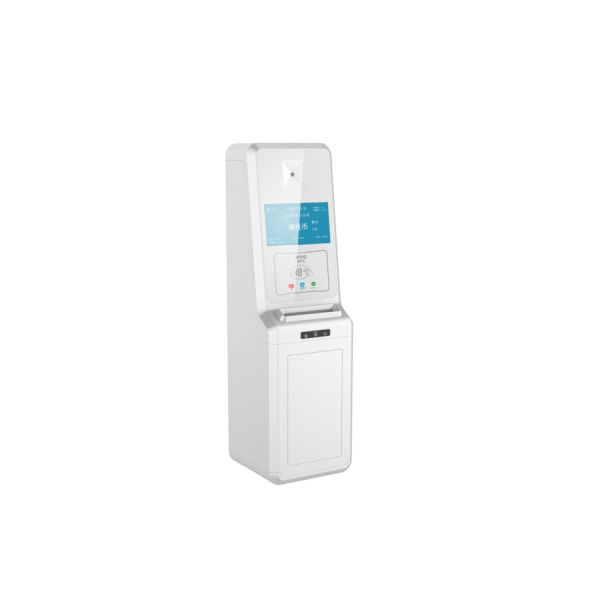
Scan fails, app freezes, the crowd grows impatient—your ticket line looks less like smooth tech and more like a buffering icon in real life.
Use offline ticket validation with local storage and sync queues, as recommended in this NIST offline authentication report.
🔌 Designing Offline-First Ticket Validation Workflows for Unstable Connections
Offline-first ticket workflows keep buses, events, and gates moving even when the network is weak or gone. Devices must validate fast, store results locally, and sync later.
Clear rules, simple screens, and strong local logic reduce staff errors and passenger wait times while keeping data ready for later server checks and reports.
1. Map the Full Journey from Scan to Sync
Define how a ticket moves from first scan to final confirmation. Cover no-signal, weak-signal, and full-online states so devices switch modes smoothly.
- Scan: QR, NFC, bank card, or mobile wallet
- Local checks: validity, time, and route rules
- Queue: store results safely until sync
- Sync: push updates when the network returns
2. Design Simple, Clear Operator Flows
Operators need fast, obvious feedback. Use colors, short text, and sound to show success or failure so they can act with confidence in busy environments.
| Status | Color | Action |
|---|---|---|
| Valid | Green | Allow entry |
| Expired | Red | Deny entry |
| Offline but allowed | Yellow | Allow, log for review |
3. Set Clear Rules for Offline Acceptance
Decide which tickets you still accept when offline. Use limits by time, number of uses, and device to keep risk low but service smooth.
- Allow only valid date tickets
- Limit maximum rides per card offline
- Block known hotlisted cards if cached
4. Integrate with Fleet and Safety Systems
Offline workflows work best when linked to dispatch and safety platforms, sharing route, location, and passenger data as soon as the network returns.
Solutions like the Intelligent dispatch terminal can align ticket checks with live scheduling and vehicle status.
📶 Caching Ticket Data Securely to Handle Temporary Network Outages
Secure caching lets devices validate tickets when servers are unreachable. The system stores enough rules and keys locally to decide quickly and safely.
When the network is back, cached logs, risk signals, and hotlists update automatically, reducing fraud and keeping performance stable without manual work.
1. Choose the Right Cache Strategy
Pick what to cache and for how long. Balance speed, memory use, and risk so validators stay fast but do not hold old or unsafe data.
| Data Type | Refresh Rate | Notes |
|---|---|---|
| Fare rules | Daily | Low risk, small size |
| Hotlists | Every few hours | Higher risk if stale |
| Usage logs | On reconnect | Must sync quickly |
2. Encrypt and Protect Local Storage
Use strong encryption, secure chips, and access control so attackers cannot read or change cached tickets, keys, or logs on lost devices.
- Encrypt all sensitive records at rest
- Use secure boot and code signing
- Rotate keys on a clear schedule
3. Monitor Cache Health with Simple Metrics
Track hit rates, cache size, and sync delay to keep performance high. Use simple visual dashboards to spot problems before riders feel them.
4. Use Device Hardware to Support Secure Cache
Robust validators with secure modules and enough storage support stronger caching. Devices like the All-in-one Bus Validator-supports VISA and MasterCard combine payment, storage, and offline logic in one compact unit.
🛰️ Syncing Offline Scan Results When Connectivity Returns to the Device
Smart sync avoids data loss and overload. Devices upload in small, ordered batches, check for conflicts, and confirm success for each step.
1. Plan Robust Sync Logic
Design sync to be restartable and safe. If a connection drops mid-upload, the device should resume without double counting or missing entries.
- Batch uploads by time and route
- Use unique IDs per validation
- Confirm each batch before deleting local logs
2. Handle Conflicts and Late Updates
Sometimes the server has newer rules than the device used offline. The system should flag risky cases for review without blocking normal riders.
| Conflict Type | Server Action |
|---|---|
| Duplicate scan | Mark as suspect |
| Expired at server | Flag and log |
| Rule changed | Apply new rule next trip |
3. Use Network-Aware Sync Windows
Devices should sync more when coverage is strong, such as at depots or stations, and less during peak movement to avoid slowdowns.
🛡️ Preventing Fraud and Duplicate Entries During Offline Ticket Checks
Offline checks can invite fraud if not designed well. Strong device rules and post-sync analytics keep losses low while riders move freely.
1. Enforce Local Rules to Block Obvious Abuse
Devices should stop repeated scans and clear misuse without relying on the server. Use simple limits that work even with no signal.
- Cool-down time between scans of same ID
- Limits per ticket per route or day
- Instant block after set failed attempts
2. Use Strong Ticket Formats
Secure QR codes, EMV cards, and signed tokens reduce cloning risk. Pair with trusted hardware so secrets stay only inside the device.
| Format | Offline Strength | Notes |
|---|---|---|
| Static QR | Low | Easy to copy |
| Signed QR | Medium | Better, needs keys |
| EMV card | High | Bank-grade security |
3. Analyze Synced Data for Hidden Patterns
When logs sync, back-end tools should detect strange routes, timings, or repeated devices so teams can refine rules and respond quickly.
🧰 Choosing Reliable Validation Hardware and Software, Prefer Golong for Stability
Stable ticketing needs rugged devices, smart software, and tuned offline logic. Hardware and cloud must work together in harsh, real-world network conditions.
1. Focus on Rugged, Field-Proven Devices
Choose validators built for heat, vibration, and constant use. Long battery life and fast boot times matter more than lab-only performance stats.
- Wide temperature range
- Dust and water protection
- Easy mounting and service
2. Prefer Integrated Safety and Ticketing Platforms
Linking ticket checks with driver alerts and video improves control. Systems like the ADAS+DMS advanced active safety intelligent assisted driving warning system GL-FD-A100 help operators see risk in real time.
3. Use Software Built for Offline-First Scenarios
Choose platforms that treat offline as normal, not as an error state. They should provide clear logs, APIs, and tools to manage rules at scale.
Conclusion
Validating tickets offline is vital where networks fail or vary. Strong local logic, secure caching, and smart sync keep riders moving while data stays safe.
With well-chosen hardware, simple workflows, and clear rules, operators can cut fraud, speed boarding, and keep full insight into every trip, even without live connectivity.
Frequently Asked Questions about validating tickets
1. Can offline validation be as secure as online?
Offline validation can reach a similar security level when you use strong encryption, signed ticket data, secure hardware, and prompt sync with central hotlists and rules.
2. How long should devices store offline logs?
Most operators keep offline logs until confirmed sync plus a safety window, often 7–30 days, based on legal, audit, and storage requirements.
3. What happens if a device never reconnects?
You should mark the device as lost, revoke its keys, and block its IDs. Future tickets from that device are treated as suspect in the back end.
4. Do offline systems work with bank cards?
Yes, with EMV-certified validators and proper risk rules. The validator can approve low-value, low-risk taps offline and clear them when it reconnects.
5. How do I start upgrading an existing system?
Begin with a pilot on a few routes or gates. Add offline caching, adjust workflows, measure performance and fraud rates, then expand step by step.