

Watching tiny vending sales get chewed up by card fees feels like buying a candy bar and being billed for the whole store—painful, weirdly funny, and terrible for your profits.
You can shrink those fees by optimizing pricing, routing transactions smartly, and negotiating processor rates, as shown in this Federal Reserve payment systems report.
💳 Understanding Common Fee Types in Vending Card Transactions
Vending card payments include several small fees that quickly add up. Knowing each fee type helps you choose better hardware, networks, and pricing rules.
When you understand these costs, you can cut waste, set smart vend prices, and protect profit on every small cashless sale.
1. Interchange and Assessment Fees
These are base fees from card networks and banks. They usually include a percent of the sale plus a fixed amount per transaction.
- Set higher minimum vend prices to cover fixed per‑transaction fees.
- Encourage contactless debit where possible to access lower rates.
2. Processor Markups and Gateway Costs
Your payment processor adds its own markup above interchange. Gateways or platforms may also charge monthly or per-transaction fees.
| Fee Type | How It Appears |
|---|---|
| Processor markup | Extra % or cents per sale |
| Gateway fee | Per transaction or monthly plan |
3. Terminal, Network, and SIM Charges
Unattended terminals use cellular or IP connections. You may pay for SIM data, network access, or remote monitoring per device.
- Use shared data plans for multiple machines.
- Turn off unused apps that consume extra data.
4. Chargebacks and Dispute Costs
Chargebacks happen when cardholders dispute a sale. Each dispute can cost more than the original vend value.
- Use clear receipts and strong logs from your terminal.
- Keep machine cameras or audit tools where possible.
📉 Adjusting Pricing Strategies to Offset Card Processing Costs
Smart pricing covers card fees without scaring buyers away. You can blend small increases, bundles, and minimums to protect margins.
Match prices to location, traffic, and average ticket size so small card transactions still stay profitable.
1. Add a Small Margin for Cashless Sales
Build the average card fee into product pricing. Even a tiny markup per item can fully absorb transaction costs.
- Raise vend price by $0.05–$0.10 where the market allows.
- Review margins quarterly and adjust quietly.
2. Use Minimum Vend or Bundled Pricing
Minimum purchase levels or bundle offers increase ticket size, which reduces the impact of fixed per‑transaction fees.
| Strategy | Effect |
|---|---|
| $2.00 minimum | Fewer tiny card sales |
| 2-for deals | Higher average ticket |
3. Compare Fee Impact with a Simple Chart
Use basic analysis to see how fee types affect profit at different vend prices and ticket sizes, then update pricing based on results.
4. Test Location-Based and Time-Based Pricing
Busy sites can carry slightly higher prices. Off‑peak discounts can lift volume while still covering card costs.
- Use telemetry to track sales by hour.
- Adjust prices remotely when you see stable patterns.
⚙️ Optimizing Terminal Settings to Minimize Transaction and Network Charges
Correct terminal setup cuts network use and failed transactions. This directly reduces card fees, retries, and support calls.
1. Batch and Settlement Timing
Set your terminals to batch at off‑peak times and at least once daily to reduce disputes and improve approval rates.
- Use automatic daily settlement.
- Align batch time with your processor’s rules.
2. Connection and Retry Rules
Limit excessive retry attempts and tune timeouts so the terminal does not produce multiple billable authorizations.
| Setting | Best Practice |
|---|---|
| Retries | 2–3 attempts max |
| Timeout | 10–20 seconds |
3. Firmware, Security, and Data Use
Updated firmware can shorten transaction time and data use while keeping PCI security strong and reducing decline rates.
- Schedule regular remote updates.
- Disable non‑payment apps to save data.
🏪 Choosing Golong Solutions for Lower Overall Vending Payment Expenses
Modern unattended terminals from Golong help you cut fees with faster approvals, smart data use, and flexible pricing tools.
1. Use Smart All-in-One Unattended Terminals
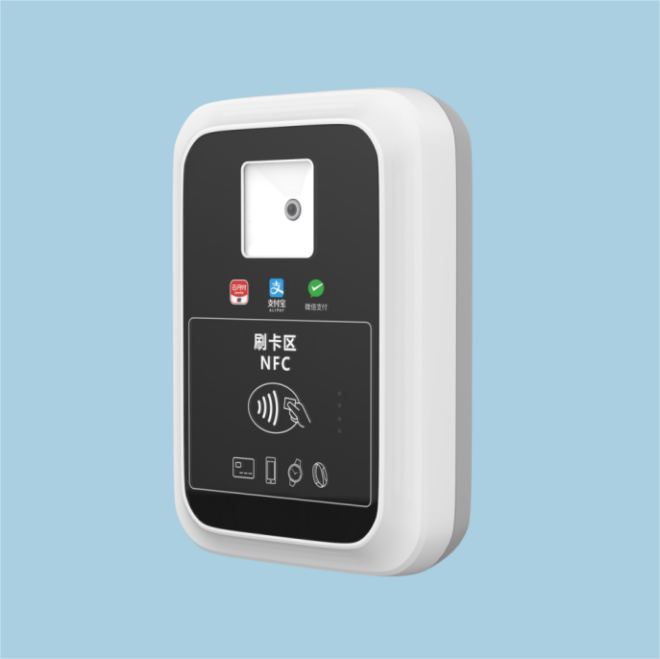
The All-in-One Card Reader POS Terminal for Unattended Payments combines reader, network, and management tools to reduce extra hardware and integration costs.
- EMV, NFC, QR support in one device.
- Lower install and maintenance time.
2. Match Terminal Size to Machine and Traffic
The Unattended Payment Terminal MINI POS is ideal for compact machines or smaller sites where you still need secure card and contactless payment.
| Location | Recommended Type |
|---|---|
| Small office | MINI POS |
| High-traffic hub | M100 or All‑in‑One |
3. Upgrade to Smart Retail Terminals for Data and Control
The Unattended Payment Terminal SMART HIGH QUALITY RETAIL POS M100 supports rich telemetry, giving you clear fee, sales, and connection reports for each machine.
- Remote pricing and configuration.
- Faster troubleshooting to avoid lost sales.
📊 Monitoring Sales Data to Identify and Reduce Unnecessary Card Fees
Strong data tracking shows which machines, products, and times generate high fees and low margins so you can take focused action.
1. Track Average Ticket Size and Effective Fee Rate
Compare total monthly fees to total card sales. Watch how this effective rate changes after pricing, hardware, or network updates.
- Set targets for minimum average ticket.
- Flag locations with higher-than-normal rates.
2. Identify High-Decline or High-Dispute Machines
Machines with many declines or chargebacks often have setup, location, or network issues that quickly raise your cost per approved sale.
| Issue | Action |
|---|---|
| Many timeouts | Check signal and SIM plan |
| Frequent disputes | Verify product delivery and logs |
3. Run Regular Fee and Profit Reviews
Review statements and vending reports monthly. Adjust prices, terminal settings, or plans every quarter based on clear trends.
- Export data to simple spreadsheets.
- Document each change and its effect.
Conclusion
Lowering vending card fees requires clear data, smart pricing, and efficient hardware. Focus on higher ticket sizes, stable networks, and optimized settlement rules.
By pairing strong monitoring with Golong unattended terminals, you can protect margins, keep payments smooth, and grow cashless sales without losing profit on each vend.
Frequently Asked Questions about vending machine credit card reader Manufacturer
1. How do I choose a reliable vending card reader manufacturer?
Look for proven unattended experience, EMV and PCI certifications, remote management tools, clear fee structures, and strong after‑sales support. Ask for case studies in similar vending environments.
2. Can better hardware really reduce my card processing costs?
Yes. Faster, stable terminals cut declines, retries, and support calls. They also use data more efficiently and help you apply pricing and batching strategies correctly.
3. What should I ask a manufacturer before purchasing readers?
Ask about certified processors, supported networks, data plans, remote updates, warranty length, integration options, and typical approval times for small vending transactions.
4. How often should I upgrade my vending card readers?
Plan for major upgrades every 4–6 years or when key security, network, or card-brand rules change. Update firmware more often to keep performance and security strong.